How to Contact Bloggers: Email and Message Templates

Every Wednesday. 28,400+ operators. Zero fluff.
✓ Check your inbox — click the confirmation link to complete sign-up.
✓ You're subscribed!
✓ You're already on the list.
TL;DR: To land features, links, and PR collabs in 2026 you still need to find the right contributor, warm them up on the channel they actually check, then send a crisp personalized email — but the tooling has changed: email-finders now have deliverability built in, HARO is gone (Connectively replaced it), and AI handles first-draft personalization while bulk-sender rules mean cold outreach must be opt-out-compliant to land at all.
[Operator’s read] This is from inside an actual P&L I’m responsible for — not theory. If something doesn’t earn its keep on a live revenue line, it’s not in here.
If you are serious about building your brand, you need to know how to reach bloggers and contributors who can feature you, link to you, or co-create content with you.
You probably have an amazing story to tell but need a way to break through the noise and get the attention of contributors at major publications — Forbes, Entrepreneur, niche industry blogs, and independent newsletters that often move more targeted traffic than big-name outlets.
The first step is to recognize that most publishing today is done by contributors and independent writers rather than staff reporters. That means they are not employed by the publication; they operate in a specific niche and publish to advance their own business objectives.
Table of contents
Open Table of contents
- Why does this matter?
- What should you look for in a contributor or blogger?
- Where to find suitable bloggers and contributors?
- 1. Forums, communities, and Substack
- 2. Content discovery tools
- 3. Source-request platforms
- 4. Your existing comments and inbox
- 5. Freelance platforms
- Step 1. Find a publication in your broad niche
- Step 2. Search that publication for your specific sub-topic
- Step 3. Read the article and find contributor contact info
- Step 4. Find their verified email
- Step 5. Warm them up on their most active channel
- DM Template:
- Step 6. Send the email
- Step 7. Follow up once, then move on
- Step 8. Your second reply (if they respond)
- 2026 deliverability — what changed
- Important points to consider
- Bottom line
- Blogger Outreach — 2026 FAQ
- The shorter version
Why does this matter?
Contributors are entrepreneurs and thought-leaders first, writers second. They pick stories that make them look smart to their audience and push their own agenda forward. Your pitch has to answer “why does this make me look good to my readers?” before it answers anything else.
To start, let’s talk about why social-first → email → call is still the right sequence in 2026…
A contributor at a high-DA publication receives dozens of unsolicited pitches a day. Cold email alone gets filtered or ignored. A warm touch on the channel they actually check — LinkedIn DM, a reply on X (formerly Twitter), or a comment on their Substack — puts your name in a different mental bucket before the email arrives.
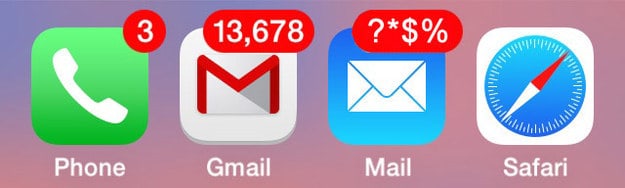
That is roughly how a typical contributor inbox looks. Standing out starts before you hit send.
What should you look for in a contributor or blogger?
Many people contact the first contributor they find after stumbling on a good article. That’s a low-percentage play. Before you reach out, vet the person against these filters:
- Transparent — a portfolio, byline list, or published examples is a reasonable ask. Anyone who won’t share past work is a red flag.
- High-quality — read two or three pieces. Look for clear structure, no obvious grammatical errors, and an engaging voice. AI-generated filler disguised as a byline is increasingly common; you can usually spot it in the first paragraph.
- Original — run a paragraph through a plagiarism checker if anything feels recycled. Duplicate content from a collaborator hurts your site, not just theirs.
- Audience-aligned — check their actual reach (newsletter subscribers, LinkedIn followers, domain authority of their primary outlet) rather than vanity metrics. A niche blogger with 8,000 engaged subscribers can outperform a Forbes contributor piece that nobody shares.
- Flexible — you need someone who will write to your brief, link naturally, and respect your editorial guidelines.
Where to find suitable bloggers and contributors?
1. Forums, communities, and Substack
Reddit, niche Slack groups, Indie Hackers, and (increasingly) Substack comment threads surface writers who are already deeply embedded in a topic. A thoughtful long-form commenter often makes a better collaborator than a professional freelancer who parachutes in.
2. Content discovery tools
BuzzSumo and Feedly still work for finding top-performing content by keyword. On X, use advanced search or a curated list to find writers who post frequently about your topic. Google search with site:forbes.com "your niche keyword" surfaces top contributors by byline.
Once you have a list of names, go deeper: read three pieces, check their LinkedIn, confirm their email is findable (more on that below), and rank by audience fit before you reach out to anyone.
3. Source-request platforms
HARO (Help a Reporter Out) shut down in late 2023. Its main replacement as of early 2026 is Connectively (connectively.us), which runs the same model: journalists post queries, sources respond. Qwoted and ResponseSource cover similar ground. These are the most compliant way to get quoted — the journalist invited contact, so there is no cold-outreach risk.
4. Your existing comments and inbox
People who comment on your own posts or reply to your newsletter are already warm. They know your work. A short “I’d love to collaborate” note converts at a much higher rate than cold outreach to strangers.
5. Freelance platforms
Upwork and Contra are solid for finding vetted freelance writers when you need someone to write for you rather than feature you. For outbound PR and link-building collabs, focus on the organic channels above.
Here’s the step-by-step process I use when I want to get featured or build a link relationship:
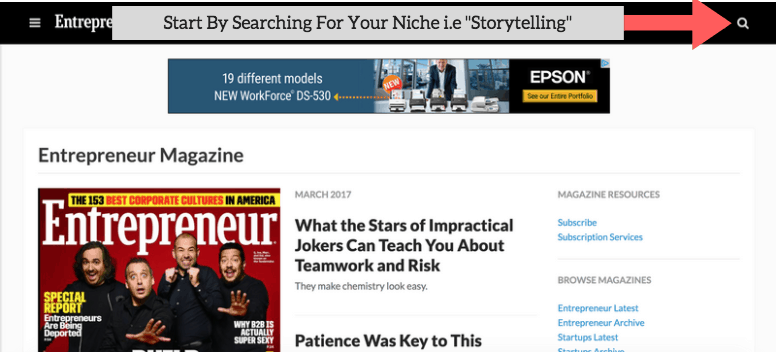
Step 1. Find a publication in your broad niche
Pick a publication where your target audience actually reads — not just one with a high DA. Niche industry blogs and top newsletters often drive better leads than general-business outlets.
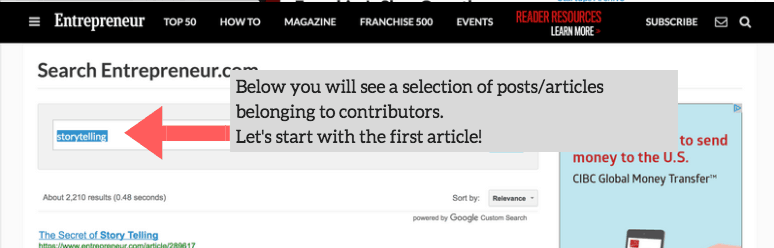
Step 2. Search that publication for your specific sub-topic
Filter by most-shared or most-viewed. You want contributors whose existing audience already cares about your angle, not just the broadest topic.
Step 3. Read the article and find contributor contact info
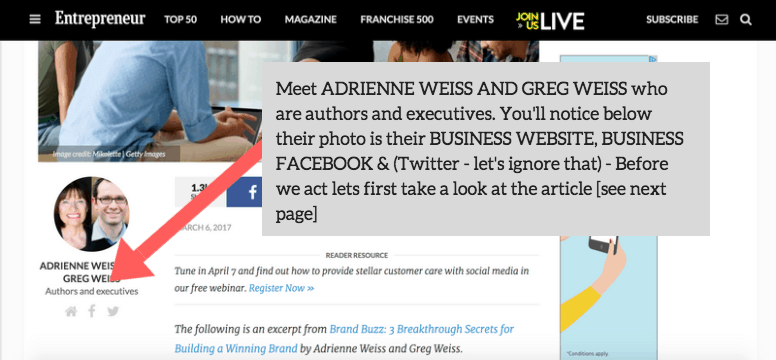
Most contributor bios link to a personal website. From there, find their LinkedIn or primary social. Note the email if it is publicly listed; if not, you will use an email-finder tool in the next step.
Step 4. Find their verified email
The best 2026 options (verify current pricing before committing):
- Hunter.io — paste a domain, get associated emails with confidence scores. Has a free tier with monthly limits.
- Apollo.io — larger database, also does enrichment and sequencing if you want scale.
- Snov.io — email finder + verification in one tool.
- LinkedIn Sales Navigator — if you are doing volume outreach across many contacts, the InMail credit and direct email-reveal features justify the cost.
Always verify the email before sending — a high bounce rate damages your sender domain reputation fast.
Step 5. Warm them up on their most active channel
Check their LinkedIn, X, or newsletter. Like or comment on something recent and genuine — not a generic “great post!” but something specific to the article. Wait a day or two, then send a short DM.
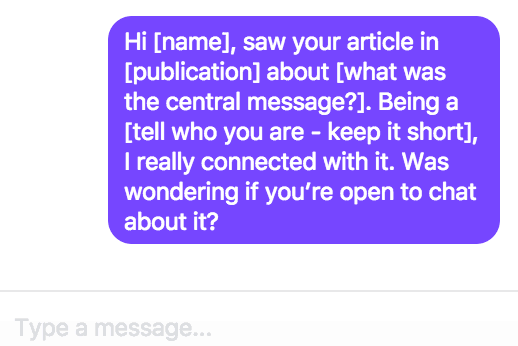
DM Template:
Hi [Name], saw your piece on [specific article] in [publication]. The section on [specific detail] hit close to home — I’m working on something similar in [your space]. Open to a quick chat?
If they reply, they will typically say “sure, shoot me an email.” Now you have permission and context.
Step 6. Send the email
Subject: Following up from our [LinkedIn/X] chat, [Name]
Email template:
Hi [Name],
Thanks for replying earlier. I came across your article “[title]” on [publication] and genuinely appreciated the point about [specific detail] — most people in my network default to [common wrong approach] and miss that.
I’m [your name], [one-sentence credibility line]. I’ve been building in [your space] for [X years] and have an angle I think would land well with your audience: [one crisp sentence on the story or collab idea].
Happy to send a full brief or jump on a 15-minute call — whichever is easier for you.
[Your name]
Keep it under 150 words. Personalization in the first two lines is the only thing that moves reply rates; everything else is formatting.
A note on AI-assisted personalization: tools like Clay or a simple Claude API integration can draft the personalized opener at scale (pulling in details from the contributor’s recent posts). This is legitimate if the underlying research is real — AI hallucinating a “specific detail” that doesn’t exist in the article is worse than no personalization at all. Always review AI-drafted openers before sending.
Step 7. Follow up once, then move on
If you get no reply after five to seven business days, send one short follow-up:
Hi [Name], just bumping this in case it got buried. Happy to send a one-paragraph brief if that’s easier. No worries if the timing isn’t right.
Do not send more than two emails to someone who has not replied. Aggressive follow-up sequences burn your domain reputation and the relationship simultaneously.
Step 8. Your second reply (if they respond)
If they reply, do not make the mistake of immediately asking for what you want. Acknowledge, add value, propose a call:
Hi [Name],
[Short sentence about yourself and why the topic matters to you.] I think the most interesting angle for your readers would be [specific hook] — it connects directly to the point you made about [their article detail].
Would a 15-minute call work? I can adjust to your schedule. I always share anything we collaborate on to my own channels to get more eyes on it.
[Your name]
2026 deliverability — what changed
Bulk-sender rules tightened significantly in 2024 and carried into 2026. If you are sending cold outreach at any volume, you need to:
- Set up SPF, DKIM, and DMARC on your sending domain. Gmail and Outlook now reject or quarantine mail from domains missing these records.
- Keep your bounce rate under ~2% — verify all emails before sending.
- Include a real opt-out in every cold email. CAN-SPAM and GDPR both require it; more importantly, ESPs like Google use engagement signals to classify your domain’s reputation.
- Don’t blast from your primary domain. Use a subdomain (e.g.
outreach.yourdomain.com) and warm it up gradually — start at 20–30 emails per day and ramp over several weeks. - Personalize at the individual level. Generic mass templates now trigger spam classifiers faster than ever. The one-to-one approach in this post is not just more ethical — it is also more deliverable.
Important points to consider
- Contributors are entrepreneurs first, writers second — pitch the story angle that benefits their audience, not just yours.
- Social warm-up before cold email is not optional for high-value targets; it is the difference between a reply and a spam report.
- HARO is gone — use Connectively or Qwoted for inbound journalist requests.
- Email finders (Hunter, Apollo, Snov) are the current standard for finding verified addresses; always validate before sending.
- Bulk-sender rules in 2026 mean even small outreach campaigns need SPF/DKIM/DMARC and a real opt-out.
Bottom line
You have a story worth telling. The mechanics of getting it in front of the right contributor have not changed fundamentally — find them, read their work, warm the relationship, then pitch cleanly. What changed is the tooling: email finders are better, deliverability requirements are stricter, AI can help personalize at scale if you supervise it, and Connectively replaced HARO for source-request opportunities.
Personalized, research-backed outreach to the right ten contributors will outperform blasting five hundred with a generic template every single time.
Here are more PR and press tactics if you want to go deeper.
Blogger Outreach — 2026 FAQ
Is HARO still active in 2026?
No. HARO (Help a Reporter Out) shut down in late 2023 after Cision acquired and then discontinued it. The primary replacement is Connectively (connectively.us), which runs the same query-and-response model. Qwoted and ResponseSource are two other active alternatives. Check current status before signing up — this space has seen consolidation (verify current).
What email-finder tool is best in 2026?
Hunter.io and Apollo.io are the two most widely used as of early 2026. Hunter is simpler and cheaper for low-volume searches; Apollo has a larger database and built-in sequencing for higher-volume campaigns. Snov.io is a solid middle ground with both finder and verifier in one. All have free tiers with limits — verify current pricing.
How many follow-up emails should I send?
Two total: the original pitch and one follow-up after five to seven business days of silence. Anything beyond two emails to a non-responder damages your sender reputation and the relationship. If they are not replying, they are not interested right now — move on and circle back in three to six months with a different angle.
Can I use AI to personalize outreach at scale?
Yes, with supervision. Tools like Clay or a direct API integration can draft personalized openers by pulling details from the contributor’s recent articles. The risk is AI inventing “specific details” that are inaccurate — that is immediately obvious to the recipient and kills the pitch. Always review AI-drafted openers before sending. Use AI for the draft, human judgment for the sign-off.
Related reading:
- How to get on Forbes, Mashable, Entrepreneur, and TechCrunch
- My best articles collection
- How to contact me
The shorter version
If you’re reading this because the workflow it describes is eating your week, that’s the kind of loop I build AI agents for. Two build slots open at a time.
Every Wednesday. 28,400+ operators. Zero fluff.
✓ Check your inbox — click the confirmation link to complete sign-up.
✓ You're subscribed!
✓ You're already on the list.
Related posts
How To Find (And Fix) Broken Links
Broken links hurt SEO and UX — here's how to find them with Screaming Frog, Ahrefs, and Google Search Console, then fix them fast with 301 redirects
ScriptsBetter ChatGPT Prompts: What to Ask for Real Answers
Modern reasoning models like GPT-5 need less hand-holding but reward clear context, structured output requests, and smart use of Projects and custom GPTs.
ScriptsCommon Google Analytics Data Errors and How to Fix Them
GA4 has replaced Universal Analytics — here are the most common data errors in GA4 (self-referrals, missing tags, cross-domain, consent mode gaps
Get the AI playbook in your inbox
Every Wednesday. 28,400+ operators. Zero fluff.
Check your inbox.
We sent you a confirmation email — click the link inside to complete your subscription. Check spam if you don't see it within a minute.
You're subscribed.
Welcome — the next edition lands in your inbox soon.
You're already on the list — look for it every Wednesday.