SiteWide आपका पूरा marketing stack किसी भी AI agent के अंदर ले आता है.
Google Analytics, Search Console, Google Ads, AdSense, Bing, Ahrefs, एक site crawler और Core Web Vitals के लिए एक MCP connector। हर एक में अपने login से sign in करें, फिर वह सवाल पूछें जिसका जवाब आप आमतौर पर छह tabs खोलकर ढूंढते हैं।
Free: हर महीने 500 requests, कोई card नहीं। Paid: 30 दिन free के बाद $9/महीना।
पहले से account है? Sign in
आपने Claude से पूछा
“इस हफ्ते organic traffic 22% गिरा है। यह Google था, हमने कुछ तोड़ा, या ads?”
- 1 gsc_search_analytics Search Console
- 2 site_health SiteWide crawler
- 3 ads_account_summary Google Ads
वजह site है, Google नहीं। बाकी हर जगह rankings 0.3 positions के अंदर टिकी रहीं1। नुकसान /guides/ के 14 pages का है, और crawl दिखाता है क्यों2: 16 सितंबर के deploy के बाद से उन पर noindex tag लगा है, इसलिए Google उन्हें index से हटा रहा है। Ads का भी कोई हाथ नहीं: पिछले हफ्ते के मुकाबले spend और paid clicks बराबर रहे3।
Fix: /guides/ template से noindex हटाएं, फिर sitemap दोबारा submit करें।
उन tools से जुड़ता है जो आप पहले से इस्तेमाल करते हैं.
आज 15 sources में 78 tools काम करते हैं, और 9 और आने वाले हैं। हर एक आपके अपने login या key से आपका अपना account पढ़ता है, और Claude तय करता है कि किसे call करना है। Data को आपस में cross-check करने का काम, जो आप वरना हाथ से करते, यही करता है।
सभी 78 tools और हर एक को क्या चाहिए →Search 4
- Search Console Google sign-in
- Bing Webmaster एक sign-in
- Ahrefs आपकी API key
- Semrush आपकी API key
Analytics और audience 4
- Google Analytics Google sign-in
- Google Tag Manager Google sign-in
- Business Profile Google sign-in
- YouTube Analytics Google sign-in
Ads और revenue 3
- Google Ads Google sign-in
- Google AdSense Google sign-in
- Merchant Center Google sign-in
आपकी site 4
- WordPress एक sign-in
- SiteWide Crawler Built in
- Internet Archive Built in
- PageSpeed & Web Vitals Built in
AI visibility 1
- Mentioned आपकी API key
आने वाले
3 और apps जल्द आ रहे हैं। चालू होते ही आप उन्हें अपने account page से connect कर पाएंगे।
- Microsoft Ads
- LinkedIn Ads
- Mailchimp
जवाब cards के रूप में आते हैं.
Claude और connector cards दिखाने वाले दूसरे apps में, SiteWide chat के अंदर ही एक card से जवाब देता है: नतीजा, trend और सबसे पहले क्या ठीक करना है। ठीक करने लायक हर finding पर एक Fix बटन होता है, जो काम सीधे Claude को वापस सौंप देता है।
-
example.com की site health दिखाओ 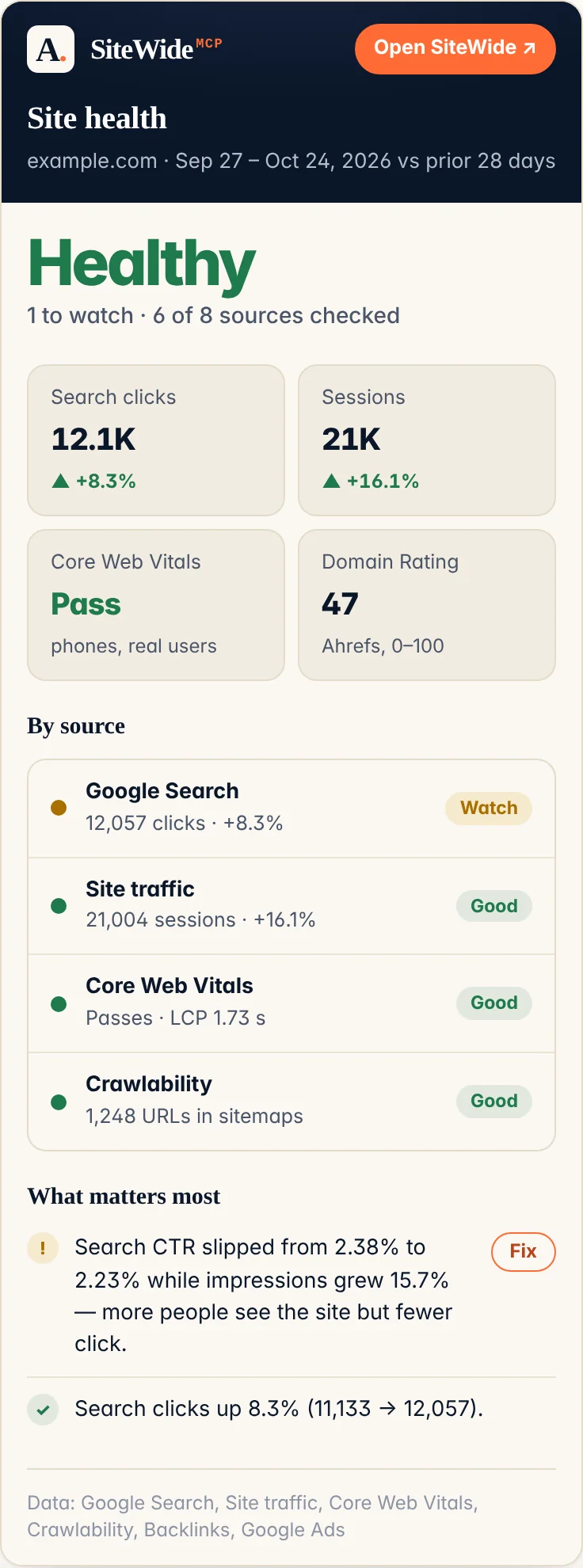
-
Google Search में example.com कैसा कर रहा है? 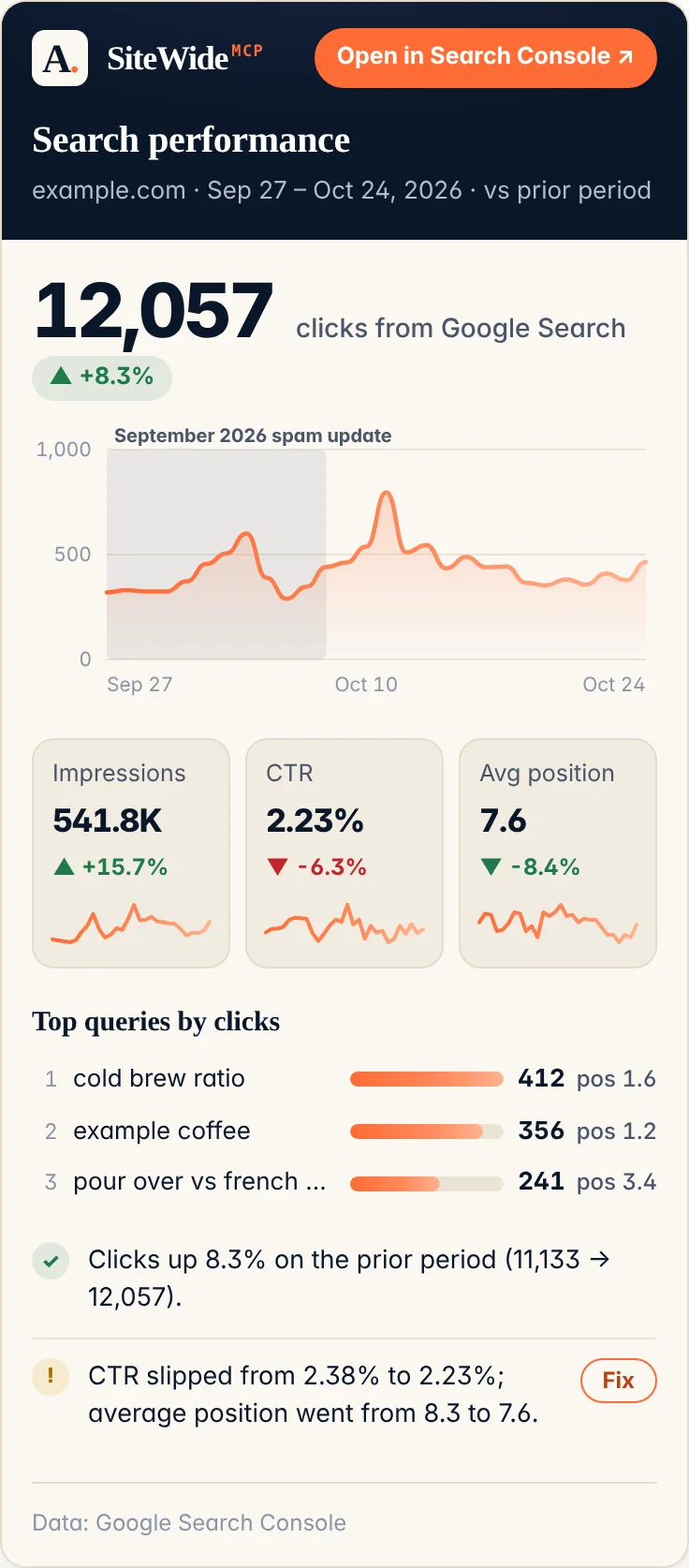
-
क्या example.com Core Web Vitals पास करता है? 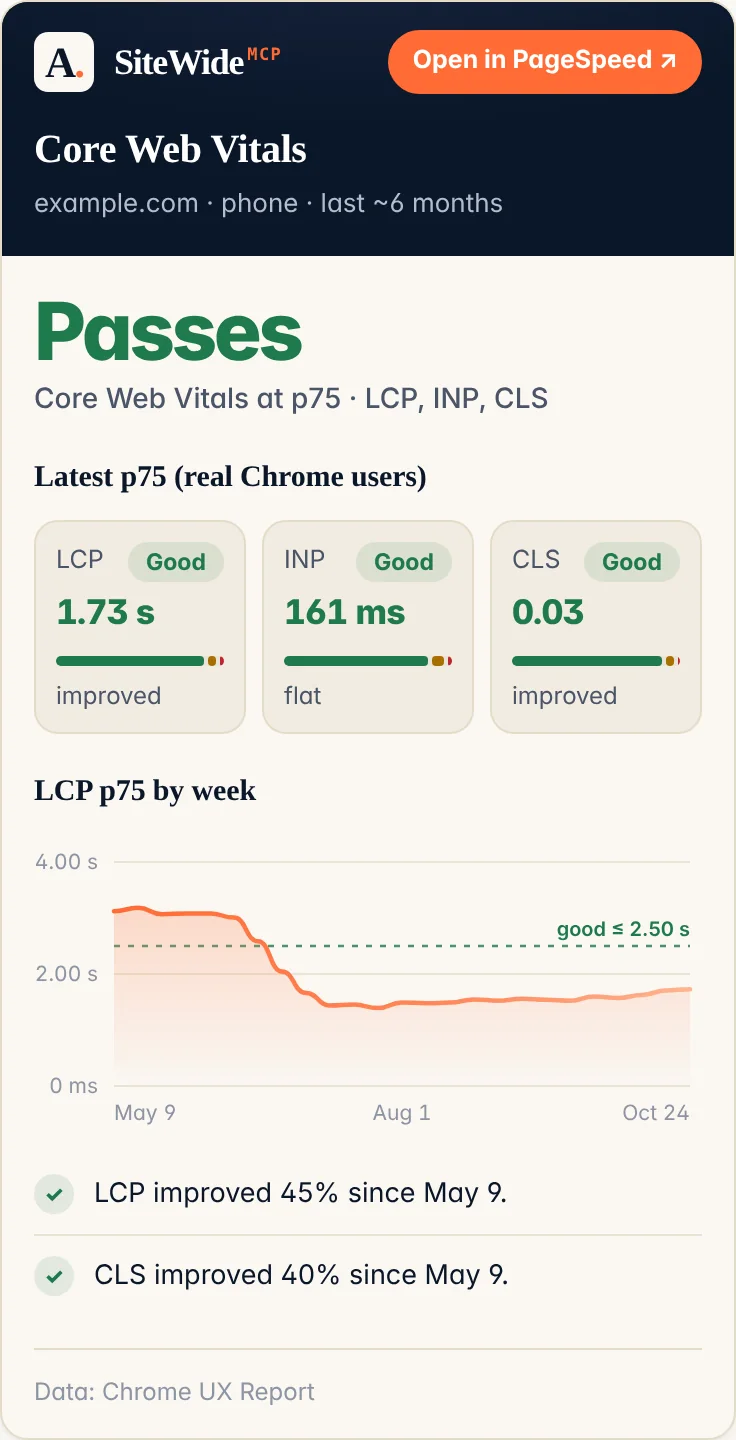
करीब एक मिनट में connected.
न Google Cloud project, न JSON key, न paste करने के लिए कोई token। Claude आपके SiteWide account में वैसे ही sign in करता है जैसे किसी और चीज़ में।
-
अपना account बनाएं
Google या email link से sign in करें। Free plan तुरंत चालू हो जाता है: हर महीने 500 requests, कोई card नहीं।
Free account बनाएं → -
Claude या ChatGPT में एक URL paste करें
Claude में: Settings → Connectors → Add custom connector। इसका नाम SiteWide रखें और यह paste करें। Advanced के नीचे वाले OAuth fields खाली रहने दें। ChatGPT में: Settings में Developer mode चालू करें, इस URL से एक connector बनाएं और OAuth चुनें।
https://mcp.alejandrorioja.com -
अपने tools में sign in करें
Claude एक SiteWide screen खोलता है: उसे approve करें और 78 tools दिखने लगते हैं। फिर अपने account page पर Google, Bing, और WordPress को एक-एक sign-in से connect करें, और अगर आप Ahrefs, Semrush, और Mentioned इस्तेमाल करते हैं तो उनकी API key paste करें। Google connect करते ही हर वह site चालू हो जाती है जिस पर आपका Search Console आपको list करता है, कुछ चुनना नहीं पड़ता।
Claude Code, Cursor या कोई और MCP client
Claude Code: इसे एक बार जोड़ें, फिर /mcp चलाएं और sign in करने के लिए SiteWide चुनें।
claude mcp add --transport http SiteWide https://mcp.alejandrorioja.com Cursor और दूसरे clients: उसी URL पर Streamable HTTP के ज़रिए एक remote server जोड़ें। जो client MCP का OAuth support करता है, वह बिल्कुल Claude की तरह sign in करता है। जो नहीं करता, उसके लिए अपने account page पर MCP और AI agents के नीचे एक token URL बनाएं (यह https://mcp.alejandrorioja.com/?token=YOUR_TOKEN जैसा दिखता है; यह एक ही बार दिखता है और कभी email नहीं किया जाता), या https://mcp.alejandrorioja.com पर Authorization: Bearer <your-token> भेजें।
जिस Google account के पास property है, उसमें sign in नहीं कर सकते?
Owner से अपना Google address जुड़वाएं: Search Console में user के रूप में (Settings → Users and permissions) और GA4 में Viewer के रूप में। फिर उसी address से Google connect करें। जैसे ही आपका Search Console आपको किसी site पर list करता है, वह site अपने-आप चालू हो जाती है, उससे पहले नहीं।
सबसे पहले यह पूछें: “तुम क्या-क्या कर सकते हो?” यह हर tool की list देता है और बताता है कि आपके account के लिए क्या पहले से connected है।
यह आपके अपने logins पर चलता है.
SiteWide वही देखता है जो आपके connect किए accounts पहले से देख सकते हैं, उससे आगे कुछ नहीं। Practice में इसका मतलब यह है।
SiteWide आपके data को कैसे handle करता है →-
हर tool में आप खुद sign in करते हैं
हर connection provider की अपनी consent screen पर, या आपकी paste की हुई key से बनता है। Credentials store होने से पहले encrypt किए जाते हैं और कभी log नहीं होते।
-
Default रूप से read-only
यह पढ़ता है। लिखता सिर्फ तब है जब आप कहें: SEO fixes, drafts और edits उस WordPress site पर जिसके लिए आपने इसे चालू किया है, पहले before-and-after दिखाकर, एक call में undo के साथ और कभी कोई delete नहीं, या आपके Ahrefs Rank Tracker में keywords जोड़ना।
-
कभी भी revoke करें
किसी tool को, या Claude जैसे app को, अपने account page से disconnect करें, या provider के पास grant cancel करें। हर एक अलग से हटता है।
-
न store, न बिक्री, न training
आपके tools जो लौटाते हैं, वह सीधे आपके assistant के पास जाता है। उसे न रखा जाता है, न बेचा जाता है, न advertising के लिए इस्तेमाल किया जाता है, न AI models को train करने के लिए।
Free शुरू करें। पैसे तब दें जब यह अपनी कीमत वसूल करे.
दोनों plans पर एक ही product, हर tool शामिल। Paid plan बस limit हटा देता है।
Free
$0/महीना
- हर महीने 500 requests
- सभी 78 tools, आपके अपने accounts पर
- कोई card नहीं
Launch price
$29 $9/महीना
- Unlimited sites और requests
- पहले 30 दिन free, 31वें दिन तक कुछ charge नहीं
- नए tools जैसे-जैसे ship हों, उसी price पर
31 अक्टूबर से पहले subscribe करें और जब तक subscribed रहें, $9/महीना ही दें। उसके बाद नए subscribers $29/महीना देंगे।
30-दिन का trial शुरू करेंConnect करने से पहले लोग क्या पूछते हैं।
क्या यह सिर्फ Claude के साथ काम करता है?
हर tool के काम करने से पहले मुझे क्या चाहिए?
domain_rating उसके बिना भी काम करता है। Crawler, Core Web Vitals और Wayback tools को कुछ भी नहीं चाहिए। कोई connection छोड़ दें, तो सिर्फ वही tools बताएंगे कि वे connected नहीं हैं। हर tool और उसे क्या चाहिए।