11 Simple On-Page SEO Tips to Rank First on Google 2026🚀

The 11 on-page tips below still rank pages on Google in 2026. For AI engines, you also need three additional structural moves: a quotable TL;DR, a numbered step-by-step block, and an FAQ section.
Every Wednesday. 28,400+ operators. Zero fluff.
✓ Check your inbox — click the confirmation link to complete sign-up.
✓ You're subscribed!
✓ You're already on the list.
Updated for AI Search (2026)
What’s new in this refresh: a section on how this strategy plays in AI search engines (ChatGPT, Perplexity, Google AI Overviews, Claude), a 4-block GEO scaffold, and a fresh FAQ.
Google still analyzes over 200 factors to rank your site — that hasn’t changed. What has changed is AI Overviews now appear on roughly 60% of US informational queries and ChatGPT/Perplexity/Claude are increasingly the surface where citation happens. The 11 tips below still rank pages on Google in 2026; the GEO scaffold added in the section at the end is what gets you cited inside AI answers.
I wish I had known even a handful of them when I started blogging.
In the beginning, it was really hard for me to write articles that will SEO well.
In fact, for almost a year I had no real organic traffic because my strategy was flawed.
Then I got serious and started blogging more and more and eventually created a blueprint that I follow every time to get my blog posts ranked.
This SEO blueprint helped my portfolio of businesses gather hundreds of thousands of impressions and visitors each month, not to mention over $200,000 in sales.
Today, I’ll show you my proven tips to create amazing content that will be loved by search engines and readers alike.
Follow the tips below and your on-page SEO will be tight — both for the Google-ranking and the AI-citation layer.
Ready to learn the secret of on-page optimization?
Let’s start with the basics…
Table of contents
Open Table of contents
- What is On-Page SEO?
- 1. Pick very good keywords
- 2. Write Amazing Content that is over 2000 words
- 3. Optimize your Meta Title and Meta Description
- 4. Have short and descriptive urls
- 5. Take advantage of the H1, H2, H3 hierarchy
- 6. Make your post exciting with images, videos, and audio
- 7. Link to previous posts and other authoritative sites
- 8. Make sharing super easy and encourage blog comments
- 9. Optimize Your Site (Technical Changes)
- 10. Create backlinks to your optimized article (this is the real ranking factor) ?
- 11. Bonus: Don’t just stop here. Keep your content fresh by regularly updating and optimizing old posts
- My 5 Favorite WordPress SEO Plugins
- Bottom line
- How on-page SEO works in AI search engines (ChatGPT, Perplexity, Google AI Overviews, Claude)
- FAQ — on-page SEO in the AI search era
- Where I’d take this next
- What changed in 2026
What is On-Page SEO?
On-Page SEO refers to the enhancements that you can make to your site to have it rank better on search engines.
These can be either to the content (i.e. text) or to the design (i.e. look) of your site.
This is in contrast to off-page SEO, which includes things done outside of your site such as creating backlinks and social shares.
Following are 11 different white-hat on-page seo factors you can optimize to rank higher on Google. I listed them in terms of difficulty vs. payout, so that if you work your way from the top you will find the best results with the least amount of effort.
1. Pick very good keywords
A big part of whether or not your content will rank and drive traffic depends on the keywords that you select.
Competing for difficult keywords with a brand new domain and a poor backlink profile is useless.
Similarly, ranking #1 for very esoteric keywords that no one searches won’t do much for you.
The solution: You need to start with keywords that are relatively simple and that still get a decent amount of traffic.
How can you find the best keywords for your industry?
I wrote an entire guide on keyword selection, but here’s the TL;DR…
-
First, write down any potential topics that you’d like to write about that pertain to your industry.
For instance if you have a gadget review site, you can write things like “iPhone 16 Pro vs Galaxy S25”, “Vision Pro setup guide”, “Roku Ultra 2025 installation”, etc. -
Type those keywords on Google Keyword Planner or on the keyword search on Ahrefs. You can also use a tool like Ubersuggest. Add any other relevant keywords you find this way to your list.
-
Now google the keywords you picked and copy the url for the site that ranks #1 for those keywords.
-
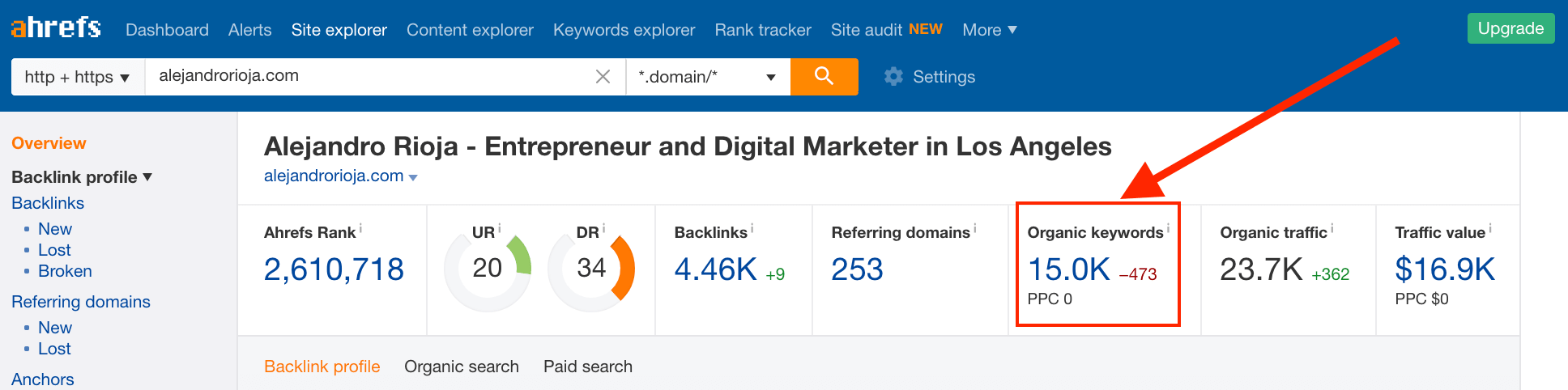
Paste the url on Ahrefs and hit “organic keywords”, from there you’ll see a list of keywords your competitors are ranking for.
-
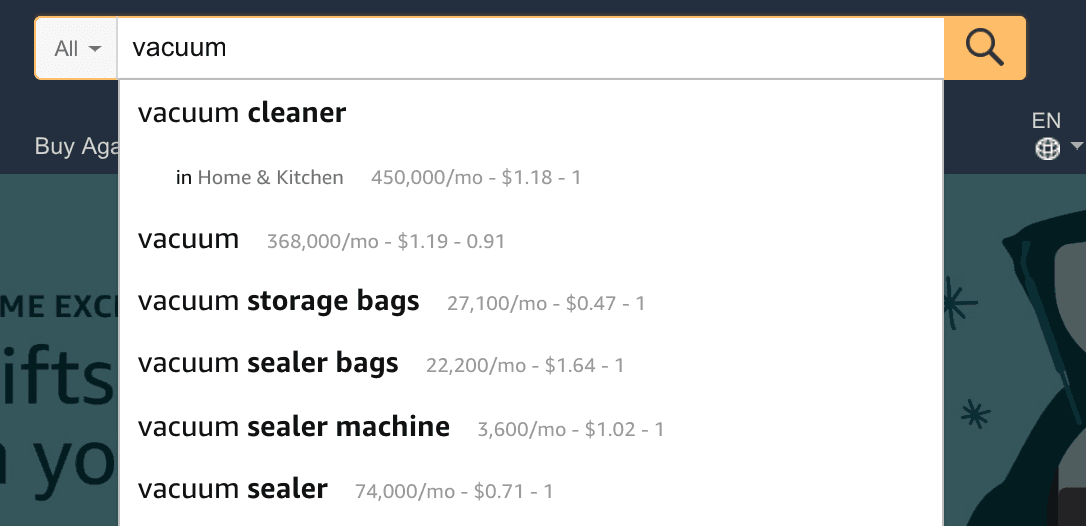
? Another way to find keywords, especially for product affiliate marketing, is to hop on Amazon and search for a product. The autocomplete function will show you related upsells and is a gold-mine for keywords. Note, you can get the volume data to show next to each keyword by installing KeywordsEverywhere on Chrome.
-
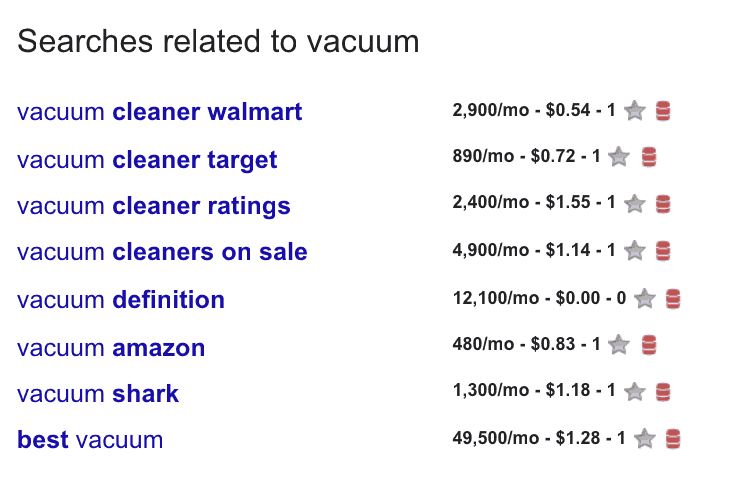
Lastly, you can look into Quora, your industry’s subReddit, and even the Google related searches for other keyword ideas.


Once you’ve followed these steps, you should have a list of very solid keywords.
With that keyword list handy, you can now pick the topics that make the most sense for your domain authority, domain age, your expertise and niche.
I personally like keywords whose difficulty is low-to-medium and that generate at least 1000 searches per month. (You can get those keywords metrics using Google Keyword Planner or any of these SEO tools)
Armed with your ideal keywords, it’s time to..
2. Write Amazing Content that is over 2000 words
First, let’s define amazing content.
Amazing content is content that:
- covers a topic in depth
- and more importantly, provides value to the reader, answering all their questions
I know that writing 300-500 word blog posts is easy, but trust me, the extra effort that it takes to write a longer blog post will be well worth it.
Why should you write long-form content?
Backlinko analyzed over 1M blog posts and concluded that posts that are ~1900 words long will rank better than shorter posts.

Through my own personal experiments I can attest that my longer blog posts tend to do much better than the shorter ones.
This post for instance easily sits over 3500 words. (which I wrote over a few iterations, not at once)
Here’s how I write comprehensive content
-
I first get the cluster of keywords that I want to include in my post, and think of the structure of my post.
For instance if I’m writing a “how to run a marathon guide”, I would want to include a section for goal setting, practicing, what to eat before/after practice, some good gear/snacks to have handy, etc. -
I fill in the blanks of each section with the most useful and direct information I can.
-
I search for my target keyword and try to summarize the top 10 articles on the first page of Google, making my article more comprehensive than any other article out there. (This is called the Skyscraper Technique).
-
If you follow this, quite effortlessly you can be at ~1000-1500 words. At this point I’m ready to publish my article (after having followed tips #3 and #4 below).
-
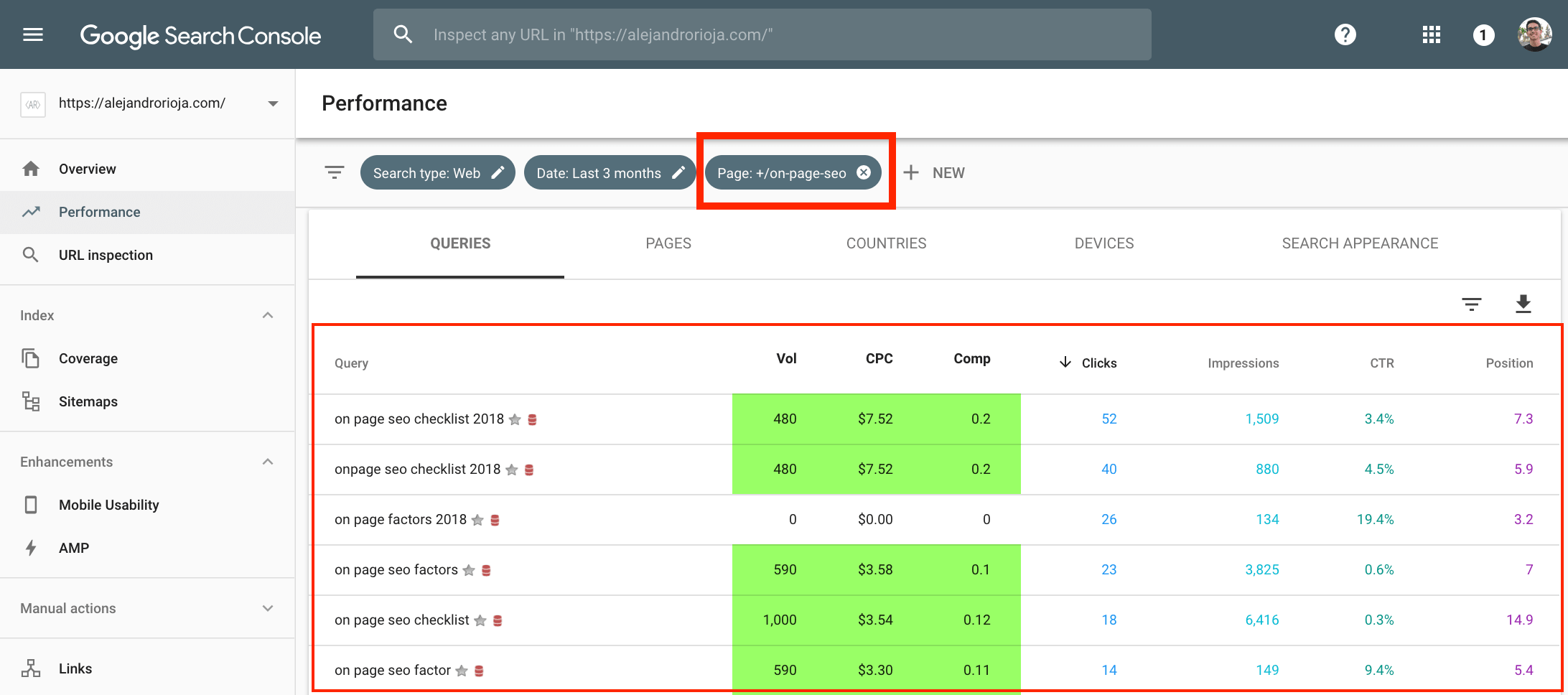
?I let my article get indexed by Google and then I monitor the keywords that are bringing traffic to my site using Search Console. From there, I’ll usually find a handful of keywords that I didn’t think about before, such as “on-page SEO checklist”, which I now include into my post (ideally as new section, if applicable).
-
? A mistake I see people make is to never update their old posts. You can easily revive an old post and add 200-300 words. I constantly revise my posts and add new information that wasn’t available previously. This taps into the freshness factor I’ll cover later.

Why does long form content do so well?
Because Google wants to show its users the most complete and accurate information possible.
Google wants you to find all the answers to your questions on result #1.
The only way for your site to do this is to cover a topic in as much depth as you can.
Pro tip: break long complex paragraphs into bite-sized sentences and space them out.
You’ll notice that my blog posts are written one line at the time.
This is intentional.
First, it helps with the flow and readability.
Secondly, it increases the time visitors spend on my site, which is a metric Google likes to look into.
Increasing the “dwell time” of your posts will do wonders to your site rankings.
Pro tip #2: Add depth to your content with keyword variations
I briefly touched this a few paragraphs above but I wanted to make sure this idea had its separate section.
Keyword variations are essentially just words that are related to your target keywords.
For instance, in this On-Page SEO guide, I’ve included words such as “on-site optimization” and “writing SEO content”.
All of these keywords that I’ve sprinkled (not stuffed) throughout my post will help me rank for thousand of other possible keyword combinations.
This keyword variety helps Google’s Rankbrain understand the context and content of my article.
Try to naturally include synonyms of keywords, but don’t overdo it.
I like to have a keyword density target should of around 1-2%.
You should try to achieve this with a mix of exact match and partial match keywords. WordPress users in 2026 are largely on Rank Math or AIOSEO rather than Yoast (Yoast’s 2023 leadership shakeup and the AIOSEO/Rank Math feature wave during 2024-25 reshuffled this category) — pick any one, they all flag the same keyword-density issues.
I also like to drop my target keyword in the first paragraph of my article.
Keywords and Content are good to go, now what?
Don’t underestimate the power of these first 2 tips.
If you do nothing but follow the aforementioned 2 SEO tips, you will do much better than if you do all the remaining ones on average or crappy content.
Now let’s take that 2000-3000 word monster article and give it the love it deserves.
For that look into tip #3.
3. Optimize your Meta Title and Meta Description
Meta titles and meta descriptions are super relevant when it comes to ranking.
A pro tip is to always include your keyword towards the start of the title.
As you can see in this post, I front-loaded the title with “On-Page SEO”, the keywords I am targeting.
On the meta description, be as succinct as possible, conveying the general idea of your post but leaving some cliffhanger at the end so that people are inclined to know more.
Also include the LSI keywords (i.e. variations of your keyword) you found on tip #1. (HitTail shut down years ago — use Keyword Insights, AlsoAsked, or any 2026 SEO platform’s “Related Questions” view instead)
Here’s the meta description I chose for this article:
“Google analyzes over 200 factors to rank your site. What if you knew them all? Optimize your site with this ultimate On-Page SEO checklist. ”
❗️Remember that Google’s new guidelines for meta description are 920px (about 158 characters) for desktop and 680px (or 120 characters) for mobile. Make those count.
How to boost your CTR
CTR (or click-through rate) is one of the main factors that Google takes into consideration when ranking sites.
The site that ranks #1 for a particular keyword will arguably get the most clicks.
So a good practice to follow is to create compelling titles that will get you clicks even if you’re result #2, #3 or #6.
Add modifiers to make your SEO meta titles more juicy
To create compelling titles, you should include modifiers.
Some very good modifiers for titles are
-
Numbers (which incite curiosity) i.e. “6 facts about weight loss”, “ No. 5 will scare you” “19 ways to do X”
-
Words like “ultimate guide”, “essential”, “free”, “quick”, “effortless”, “best” etc
-
Compilation or reviews “Must-Try Tilapia Recipes”, “Top 10 psychology books” (people love compilations)
-
Year – “How to do SEO in 2026”, “Holiday 2026 shopping list”
-

Massive tip below
You can find some of the potential modifiers by looking at the “Searches Related to X” at the bottom of each Google Search.

An added benefit of modifiers (besides increasing your CTR) is that modifiers will help you rank for long-tail keywords almost effortlessly thanks to Google’s Rankbrain.
Below are 2 more ways to crush your CTRs…
Use emojis on your meta title ?
A top SEO tip for meta tags is to use emojis.
As you can see, this attention-grabbing yellow icons will drive your CTR through the roof.
Higher CTR = higher Google rankings.

- You can get the Decimal HTML Entry code for any given emoji by searching on iEmoji. (You can also activate the emoji keyboard on mac by pressing Ctrl + Cmd + Space)
Make your site stand-out with Schema Markup
Schema Markup allows you to add things like ratings, images, author name, etc to your result, as shown here:

In 2026 the cleanest path is Rank Math or AIOSEO on WordPress (both ship full schema editors), or hand-roll JSON-LD if you’re on a static site (see my Schema Markup for GEO breakdown — schema is now a primary AI-engine citation signal, not just a Google rich-result tiebreaker).
Test your structured data with Google’s Rich Results Test — the older Structured Data Testing Tool was deprecated in 2020 and the Rich Results Test is the supported successor.
Win the featured snippet (and make it rain)
The Featured Snippet is the box that usually appears when you ask a question whose answer can be found in steps or can be answered in a paragraph.
Here’s an example:

To win the featured snippet you should structure your subheadings in a way that answers people’s questions.
If you are discussing “5 steps to weight loss”, then each subheading should be one of those 5 steps.
Paragraph snippet answers should be around 40-60 words long for the best chances of winning the snippet.
Note: you will only win the featured snippet if you are already ranking on the first page of Google.
Next tip is a very easy win..
4. Have short and descriptive urls
Which url do you prefer?
- yoursite.com/blog/archive/10/22/2024/this-is-the-seo-strategy-I-use-lol/page/1
- yoursite.com/seo-strategy
- yoursite.com/?p=345
I certainly hope you picked #2.
Search engines have the same preference: the Matt Cutts era interview — Cutts left Google in 2014 but the URL-weighting principle held through the Core Update sequence of 2022-25, and Mueller and the post-Cutts Search Relations team have reaffirmed it multiple times since.
When it comes to choosing the slug, try to make it as short as possible while still fitting your keyword in.
In some cases, stop words should be removed but it’s fine if you leave them there. (Stop words are words like “a”, “the”, “is”).
Here are other things to keep in mind:

Note: On WordPress to change the default Permalink structure go to Settings > Permalinks. Then select “Post Name” as your permalink.
5. Take advantage of the H1, H2, H3 hierarchy
As we mentioned on tip #3, headers will help you win featured snippets.
Here’s a quick run-through of each Heading tag’s purpose:
- H1 should be reserved exclusively for the title of your post. It is important that you check that your website structure (or WordPress theme) respects this. Please take a second to check that NOW.
- You can use H2 tags for subheadings if you are writing a “6 steps” guide for instance. You can sprinkle your keyword in one or two H2 subheadings for an added SEO boost.
- And finally H3, H4 for any additional sub-steps that your guide has. Tip: on WordPress, you can highlight some text then press Ctrl + Alt Option + 3 for an H3 tag for instance.
Don’t forget to include an intro and a conclusion to tie it all together. But more importantly…
6. Make your post exciting with images, videos, and audio
Not everyone learns purely by reading. When you write content, target also the auditory and visual learners.
Not only will this get you more readers but will also increase the time on site, a very important metric for Google when it comes to deciding if your site is worth showing on the SERPs.
Moreover, adding multimedia to your post will also make your post seem more complete and therefore will get you a higher chance of bringing in those organic backlinks.
I usually like to embed videos into my posts, because my readers love them.
Since I don’t generally have the time to film SEO videos, I’ll embed a strong one from someone else. Brian Dean’s Backlinko walk-throughs were the canonical embeds during the 2018-22 era; since the Semrush acquisition of Backlinko in 2022, Semrush Academy and the Ahrefs YouTube channel are the two highest-signal SEO embeds in 2026.
Don’t forget about the alt-text
Alt-text helps crawlers understand what the images are all about. Make sure you include some keywords when naming your images.

Now let’s talk about linking…
7. Link to previous posts and other authoritative sites
Outbound and inbound linking is critical to a healthy SEO article.
Internal linking refers to linking to other pages on your site. External links are links to other sites.
Cross-linking your content will not only lead to lower bounce-rates but also can help you forge a stronger relationship with your readers.
A great example of internal linking is Wikipedia.
Notice that every link is keyword-rich and links to a very authoritative and extensive post about that topic.

Fun Fact: I was born in Bolivia
For outbound links, you should link to 4-6 external sites per post.
Since I managed other sites (like Future Sharks and Young Slacker), I liked to link to some of them and also to a few sites that I don’t own to mix the outbound linking DA, DR of the post.
Two caveats when linking
- You should only link to relevant and useful resources.
- Also ideally you shouldn’t directly link to third party blog posts that are targeting the same keywords.
When you link to someone, make sure to drop them an email telling them so! They might shout you out on their social media profiles, getting you more social traffic.
Speaking of social signals…
8. Make sharing super easy and encourage blog comments
Social signals now make a considerable dent in rankings.
Take a look at the social shares of this article.

The added benefit of social sharing is that you will get more traffic from social networks and make more revenue through ads.
Moreover, that extra exposure will probably also land you some juicy backlinks.
You can add social buttons with this easy WordPress plugin.
Additionally, you should encourage people to comment on your post. Google notices this interaction and rewards you for creating this buzz-worthy content.
A simple “comment below what your new favorite SEO technique is” will give you a great amount of engagement.
Now let’s get technical, shall we?
9. Optimize Your Site (Technical Changes)
Three very important things you need to have on your site
- Fast loading content (no-heavy Javascript, all loaded via a premium CDN ). You can install a cache plugin like WordPress Fastest Cache to solve this. You can also invest in a premium CDN.
- Small Image sizes: You should reduce the file size of the images before you upload them to your editor, with a tool like ImageCompressor.
- Mobile responsiveness (If your site is still not optimized for mobile, what the heck are you doing? Google has explicitly stated that it will penalize sites that are not mobile-ready) You can buy a ready-made responsive theme from Themeforest and save you the headache.
Pro tip: Install the AMP plugin for WordPress to rank even higher.
If you are not comfortable with making the technical changes, talk to your developer (or web host) about making these important changes to your website.
10. Create backlinks to your optimized article (this is the real ranking factor) ?
Even though backlinks are not technically considered part of On-Site Optimization, I wanted to include them here because they are super important.
A lot of guides about the perfect seo post always seem to omit the fact that you need to create backlinks for that specific page/post.
When you analyze the top results for any given keyword you will notice that the top results will generally have a strong backlink profile.
On Ahrefs, if you type a given keyword on their Keyword Research tool you will find just about how many backlinks you need to rank at the top 10.

For instance, a website writing about “hire a plumber” needs ~20 backlinks to be in the top 10 results.
Once you have an amazing piece of content and know roughly how many backlinks you need, it’s a simple game.
You can build backlinks by reaching out to bloggers and have them link your article, guest posting on great sites, and more. (I wrote more about my ranking tips and backlinking techniques on my SEO guide.)
11. Bonus: Don’t just stop here. Keep your content fresh by regularly updating and optimizing old posts

You can push the freshness score of your post up by taking a look at trends, updating posts with new information and also looking at seasonal things like Holidays.
A hack that also works is to update the published date of your posts whenever you make substantial changes to them. I have experienced a bump in rankings whenever my posts seem recently published.
?Lastly, take full advantage of the data available to you via Google Analytics and Google Search Console. Both of these places will show you the keywords that are driving traffic to each blog post, which pages are performing well, and more.
Don’t forget to get my free Ebook on “11 simple on-page SEO tips to rank first on Google” below.
My 5 Favorite WordPress SEO Plugins
Here’s my ultimate essentials when it comes to wordpress SEO plugins
- Yoast SEO: to review every on-page detail I’ve discussed here
- WP Fastest Cache: to load content fast
- Shortpixel: for image optimization
- AMP: to render blazingly fast websites on mobile
- Redirection: for 301 redirects
A word of warning about Blackhat seo ?
So far, all the techniques I’ve shared have been fully white-hat and complaint with Google’s best practices.
If you follow these steps you should see your posts rank within a few weeks.
However, you might be tempted to shortcut your way to the top of Google.
You might come across some shiny new technique on a forum that claims #1 rankings by means of artificial backlinks, doorway pages, cloaking, PBNs and so forth.
I encourage you to stay away from these.
These techniques might get you ranked quickly today, but rest assured Google will catch up to them tomorrow, destroying all your rankings and probably even penalizing you.
It is much better to build a site for the long-term with quality content and quality links.
Bottom line
I’ve shared with you my best white-hat SEO tips.
These are the top on-page SEO factors out there that have helped me get over 100,000 visitors per month to my site.
If you follow this checklist, you will start seeing more traffic and higher SERP positions (also a higher Alexa rank).
As a quick recap, you need to
- Select the right keywords and their variations
- Write long posts of over 2000 words
- Use compelling meta copy to increase CTR
- Link to high authority domains and link to other posts when appropriate
- Structure your post with H-tags, bold keywords, alt text, intro and conclusion
- Add images and videos
- Clean up your permalinks
- Encourage sharing and commenting
- Create backlinks to your article
- Review and update your articles every so often
- Ignore the blackhat temptation
Here’s a handy infographic about On-Page SEO from Brian Dean from backlinko.com to drive all my points home:

Hope you found this post valuable.
If you did, drop a 5+ sentence comment telling me which factor you didn’t know about and share this article with your marketing friend. I’m running a contest to give a free Flux Charger to one lucky commenter!
(Commenting will also earn you a free backlink!)
Read also:
- My list of hot SEO tips to shoot up to #1
- how NOT to do mobile SEO
- How to find keywords your competitor aren’t targeting
- 9 Off-Page SEO Factors you need to know about
- —-> Do not miss: the best articles on digital marketing I’ve ever written
How on-page SEO works in AI search engines (ChatGPT, Perplexity, Google AI Overviews, Claude)
On-page SEO has historically meant title tag, meta description, H1/H2 hierarchy, internal links, image alt text, and schema. All of that still matters. What changes for AI engines is the structural overlay — they want clean, extractable blocks they can lift verbatim into an answer.
In my testing, the highest-leverage on-page changes for GEO are: (1) a 2-4 sentence TL;DR at the top of the post that answers the head query directly, (2) a numbered list of 4-7 steps somewhere in the body that an LLM can quote, and (3) an FAQ section using the literal questions people search. None of these hurt classic SEO — and AI Overviews / Perplexity / ChatGPT preferentially cite pages that have all three.
The 4-block GEO scaffold for on-page SEO
- Lead with a TL;DR. 2-4 sentences at the top of the post that answer the head query directly. AI Overviews and Perplexity preferentially cite this block.
- Add a numbered step-by-step section. Generative engines extract clean ordered lists into their answers more reliably than prose.
- Close with an FAQ. Use the literal phrasing of questions people actually ask in your niche; mark up with FAQPage schema.
- Cite primary sources. Link to Google’s own AI Overviews documentation, OpenAI’s structured-data guidance, and Anthropic’s content-quality posts. LLMs trust pages that cite the model providers themselves.
Internal reading on AI SEO + GEO
If you’re building this into your stack, also read: the full SEO guide for 2026, What is SEO?, the schema markup tutorial, 17 white-hat SEO techniques.
FAQ — on-page SEO in the AI search era
Will adding a TL;DR hurt my Google rankings?
No — and in my testing it slightly helps. Google’s own quality guidelines reward content that answers the query upfront. A clean TL;DR is consistent with that. The bigger risk is a TL;DR that’s too long or too keyword-stuffed; keep it 2-4 sentences and conversational.
How long should an FAQ section be for AI Overviews?
3-7 questions is the sweet spot. Each question should match the literal phrasing people use; each answer should be 2-4 sentences. Add FAQPage schema. Don’t recycle questions that are already covered in your H2s — the FAQ is for the questions that didn’t fit naturally in the body.
Does schema markup matter more or less in 2026?
More. Generative engines lean heavily on schema to extract structured data. Article, FAQPage, and HowTo are the three that pay off the most. See the schema markup tutorial linked above.
Where I’d take this next
If you operate inside any of the loops above, I build custom AI agent systems that automate them. The whole site you’re reading is one — here’s the stack.
What changed in 2026
SEO in 2026 is unrecognizable from the 2020-era playbook. Three shifts that matter for anything written before mid-2024:
- AI Overviews are the new SERP zero position. Google’s AI Overviews default to roughly 60% of US informational queries, eating most “what is” / “how to” CTR. Optimizing for citation inside the AI Overview is now as important as ranking #1.
- GEO (Generative Engine Optimization) is the working term for cross-engine optimization — getting cited inside ChatGPT, Perplexity, Claude, and Gemini answers. ~12% of high-intent commercial queries in late 2025 sample studies showed a direct-citation flow from these engines (vs. zero pre-2023).
- E-E-A-T (now E^3-A-T, Experience + Expertise + Establishment + Authoritativeness + Trustworthiness) continues to be the framing Google uses internally — “Establishment” was the 2024 addition emphasizing brand-level signals.
Tool landscape (2026): Ahrefs and Semrush both shipped Generative Engine tracking. Surfer SEO + the Topical Authority crowd added GEO scoring. Screaming Frog still the standard crawler. AlsoAsked, Keyword Insights, and Frase shifted heavily into AI-Overview snippet engineering.
If this post predates May 2024, treat its core advice as the Google-search baseline and layer the GEO playbook on top.
Free tool: preview exactly how your title and description will render (and get truncated) in Google with the SERP snippet preview tool.
Every Wednesday. 28,400+ operators. Zero fluff.
✓ Check your inbox — click the confirmation link to complete sign-up.
✓ You're subscribed!
✓ You're already on the list.
Related posts
How to Get Your Brand Cited Inside ChatGPT Answers (2026)
Getting cited by ChatGPT isn't about ranking — it's about being the cleanest source to lift. Write a direct-answer TL;DR, mark up entities
SEOChatGPT Search vs Google: A Test on 50 Head Terms
I ran the same 50 head terms in ChatGPT search and Google (with AI Overviews) and tracked which sources each engine cited.
SEOHow to Write a TL;DR That AI Engines Actually Cite
A TL;DR isn’t a summary of your post — it’s a direct answer to the head query, written in 2–4 sentences, structured so an AI engine can lift it verbatim into…
Get the AI playbook in your inbox
Every Wednesday. 28,400+ operators. Zero fluff.
Check your inbox.
We sent you a confirmation email — click the link inside to complete your subscription. Check spam if you don't see it within a minute.
You're subscribed.
Welcome — the next edition lands in your inbox soon.
You're already on the list — look for it every Wednesday.